Factories > Getting started
How Warp Factories work
# How Warp Factories work :::note Warp Factories is in **Early Access** and available to a limited set of teams. [Request access](https://www.warp.dev/factories/request-access) to use it with your team. ::: A factory is a team of cloud agents that ships software the way your team does: a request comes in, moves through the stages it needs, and comes back as a pull request ready for review. You talk to one agent, the **foreman**, from the tool that sends the request, such as Slack or Linear. The foreman dispatches the factory's other agents, and each one owns a part of the software development lifecycle. Deciding which repositories belong in this factory is a separate question. See [sizing a factory](/factories/#sizing-a-factory) for that guidance. A **work item** is a single request the factory acts on, such as an issue, support request, pull request, or Factory MCP task. It keeps its identity from intake to handoff, however many agents contribute to it along the way.  The diagram's components, from intake to improvement: * **Work sources** - Work items arrive from [Slack](/factories/integrations/slack/), [GitHub](/factories/integrations/github/), [GitLab](/factories/integrations/gitlab/), [Linear](/factories/integrations/linear/), or [Jira](/factories/integrations/jira/), from local coding agents through the [Factory MCP](/factories/factory-mcp/), or from direct runs and schedules. * **Automations** - [Automations](/factories/automations/) filter provider events and decide which agent handles them. Schedules fire them on a timer; direct requests go straight to the foreman. * **Foreman and stage agents** - The foreman holds one conversation per work item and dispatches the Triage, Spec, Implement, and Review agents as the work needs them. See [factory agents](/factories/factory-agents/) and the stages below. * **Human handoff** - The factory opens a pull request with evidence, updates the original work item, and you review and merge. * **Factory definition** - Version-controlled agents, automations, runners, and skills define the factory, either Warp-managed or in a GitHub repository your team owns. See [definitions as code](/factories/factory-as-code/). * **Execution** - Every stage runs as a cloud agent run on Warp-hosted or [self-hosted](/platform/self-hosting/) compute, with the workspace from the factory's repositories and each stage's configured model and [harness](/platform/harnesses/). * **Factory dashboard** - Metrics, work items by stage, and runs and costs. See the [factory dashboard](/factories/factory-dashboard/). * **Measure and improve** - [Scorers](/factories/measure-and-improve/) grade completed work, benchmarks compare configurations, and self-improvement turns repeat failures into follow-up pull requests for your review. ## How a work item moves through the factory The foreman coordinates every work item. It routes work between the factory's agents, passes each one the context it needs, and continues existing agent conversations instead of starting new ones. See [factory agents](/factories/factory-agents/) for what each agent does. Not every work item needs every stage. The foreman picks the shortest path that still meets your quality policy: it skips stages when the work is already well defined, starts partway through when enough context exists, and sends work back to an earlier agent when revisions are needed. ### Stages The diagram below shows the default path through a factory's stages. ```mermaid flowchart LR Intake[Intake] --> Foreman[Foreman] Foreman --> Triage[Triage] Triage --> Decision{Plan needed?} Decision -->|Yes| Planning[Planning] Decision -->|No| Building[Building] Planning --> Approval["Human review<br/>(default policy)"] Approval --> Building Building --> Reviewing[Reviewing] Reviewing --> Revision{Revision needed?} Revision -->|Yes| Building Revision -->|No| Handoff["Human handoff<br/>(default policy)"] Handoff --> Complete[Complete] ``` * **Intake** - A work item enters from a [connected integration](/factories/connect-your-factory/), an automation, a direct run, or the [Factory MCP](/factories/factory-mcp/). It keeps its source context as it moves through later stages. * **Triage** - The triage agent researches the request, reproduces the problem when needed, and defines the scope and complexity of the change. The foreman skips this stage when the request already explains the problem and what needs to change. * **Planning** - The spec agent defines product behavior, technical constraints, and validation criteria. The foreman skips this stage for small, well-understood changes. * **Building** - The implement agent makes the code change on a branch and opens a pull request with test and visual evidence. * **Reviewing** - The review agent checks the change against the requirements, tests, and security expectations, then sends findings back for another pass. Its verdict is advisory. * **Human handoff** - The factory presents the result, its evidence, and any findings. A person decides what happens next. * **Complete or Cancelled** - The work item ends when the factory finishes its work, or stops early if someone cancels it. These are the stage names the [factory dashboard](/factories/factory-dashboard/)'s **Activity** view uses, where you find, filter, and stop work items. Stages and agents are named separately, so the spec agent works the Planning stage, the implement agent works the Building stage, and the review agent works the Reviewing stage. Each agent's run within a work item is an ordinary [cloud agent run](/platform/) you can watch and steer. ## Where your team stays in charge A factory is built to pause when there is a decision that needs to be made by a person. By default, that's three places: * **Approving the spec** - When work goes through the Planning stage, the Building stage waits until a person signs off on the plan. * **Answering questions** - When requirements are unclear or a review finding is ambiguous, the foreman asks instead of guessing. * **Merging** - The factory opens the pull request and hands it off. Whether and when it merges is your team's call. The first two are workflow policy, written into the foreman's instructions; edit them to change when the factory checks in. Merging is enforced by your repository, so if you require human-only merges, use branch protection and repository permissions. ## How the factory improves itself Your factory is self-improving, and you define what "better" means. [Scorers](/factories/measure-and-improve/) classify completed runs against criteria you write, and [Self-improvement](/factories/measure-and-improve/#configure-and-review-self-improvement) groups the failures they flag into follow-up runs that propose fixes — to the application code or to the factory's own definition. Every proposal arrives as a change for your review; nothing is adopted on its own. The factory's definition is open to the same loop. Anyone on the team, or an agent, can propose changes to its instructions, skills, models, or other [definition files](/factories/factory-as-code/), and definitions stored in GitHub go through pull request review and [configuration checks](/factories/factory-as-code/#pull-request-checks-for-github-backed-factories) before a change reaches the production branch. See [measure and improve](/factories/measure-and-improve/) for the evaluation workflow, or [build a self-improving agent](/guides/agent-workflows/build-a-self-improving-agent/) to apply the same pattern to a standalone agent.Tell me about this feature: https://docs.warp.dev/factories/how-factories-work/A factory's foreman routes each work item through triage, planning, building, and reviewing, with humans making the key decisions.
A factory is a team of cloud agents that ships software the way your team does: a request comes in, moves through the stages it needs, and comes back as a pull request ready for review. You talk to one agent, the foreman, from the tool that sends the request, such as Slack or Linear. The foreman dispatches the factory’s other agents, and each one owns a part of the software development lifecycle.
Deciding which repositories belong in this factory is a separate question. See sizing a factory for that guidance.
A work item is a single request the factory acts on, such as an issue, support request, pull request, or Factory MCP task. It keeps its identity from intake to handoff, however many agents contribute to it along the way.
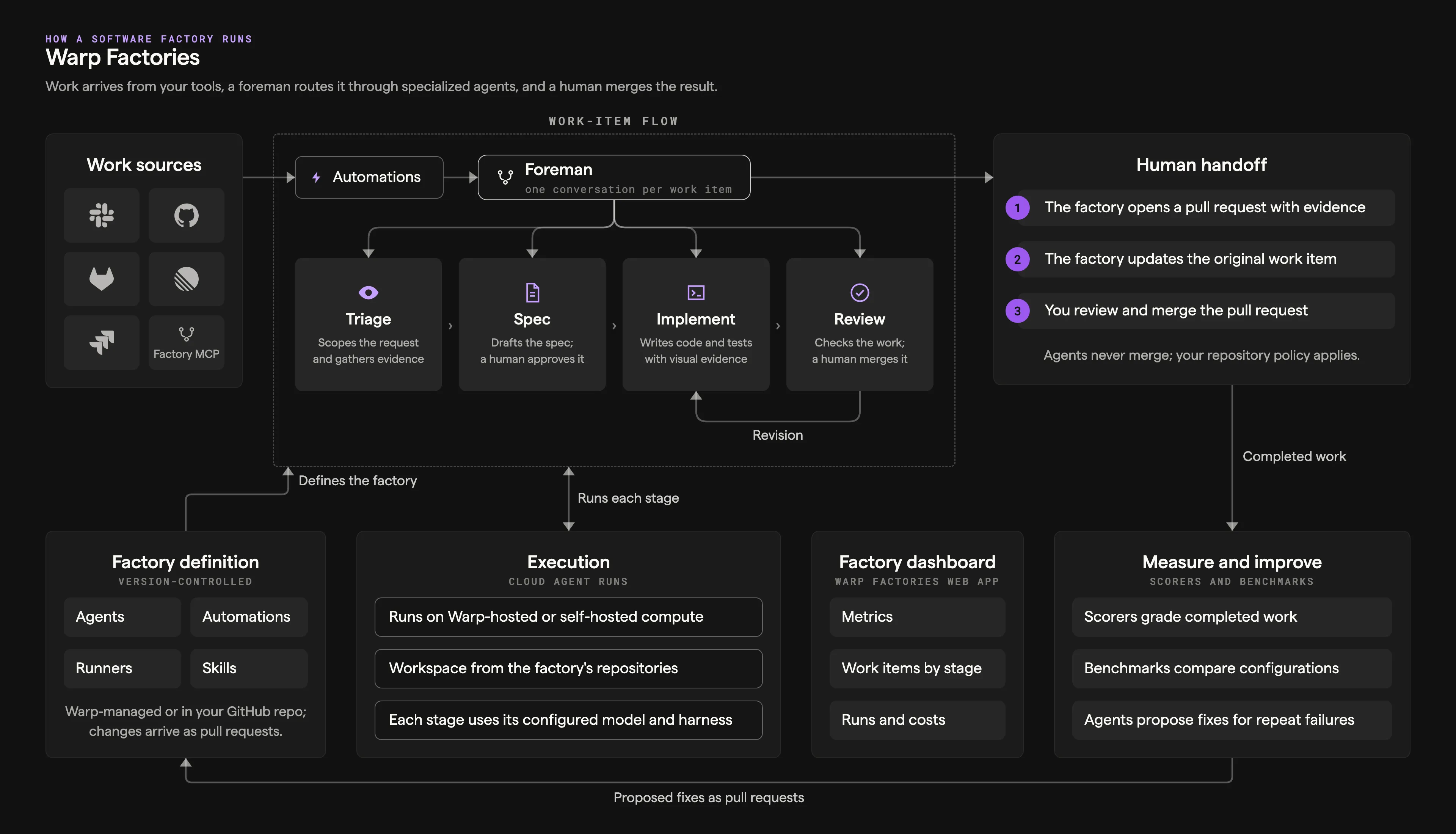
The diagram’s components, from intake to improvement:
- Work sources - Work items arrive from Slack, GitHub, GitLab, Linear, or Jira, from local coding agents through the Factory MCP, or from direct runs and schedules.
- Automations - Automations filter provider events and decide which agent handles them. Schedules fire them on a timer; direct requests go straight to the foreman.
- Foreman and stage agents - The foreman holds one conversation per work item and dispatches the Triage, Spec, Implement, and Review agents as the work needs them. See factory agents and the stages below.
- Human handoff - The factory opens a pull request with evidence, updates the original work item, and you review and merge.
- Factory definition - Version-controlled agents, automations, runners, and skills define the factory, either Warp-managed or in a GitHub repository your team owns. See definitions as code.
- Execution - Every stage runs as a cloud agent run on Warp-hosted or self-hosted compute, with the workspace from the factory’s repositories and each stage’s configured model and harness.
- Factory dashboard - Metrics, work items by stage, and runs and costs. See the factory dashboard.
- Measure and improve - Scorers grade completed work, benchmarks compare configurations, and self-improvement turns repeat failures into follow-up pull requests for your review.
How a work item moves through the factory
Section titled “How a work item moves through the factory”The foreman coordinates every work item. It routes work between the factory’s agents, passes each one the context it needs, and continues existing agent conversations instead of starting new ones. See factory agents for what each agent does.
Not every work item needs every stage. The foreman picks the shortest path that still meets your quality policy: it skips stages when the work is already well defined, starts partway through when enough context exists, and sends work back to an earlier agent when revisions are needed.
Stages
Section titled “Stages”The diagram below shows the default path through a factory’s stages.
flowchart LR
  Intake[Intake] --> Foreman[Foreman]
  Foreman --> Triage[Triage]
  Triage --> Decision{Plan needed?}
  Decision -->|Yes| Planning[Planning]
  Decision -->|No| Building[Building]
  Planning --> Approval["Human review<br/>(default policy)"]
  Approval --> Building
  Building --> Reviewing[Reviewing]
  Reviewing --> Revision{Revision needed?}
  Revision -->|Yes| Building
  Revision -->|No| Handoff["Human handoff<br/>(default policy)"]
  Handoff --> Complete[Complete]
- Intake - A work item enters from a connected integration, an automation, a direct run, or the Factory MCP. It keeps its source context as it moves through later stages.
- Triage - The triage agent researches the request, reproduces the problem when needed, and defines the scope and complexity of the change. The foreman skips this stage when the request already explains the problem and what needs to change.
- Planning - The spec agent defines product behavior, technical constraints, and validation criteria. The foreman skips this stage for small, well-understood changes.
- Building - The implement agent makes the code change on a branch and opens a pull request with test and visual evidence.
- Reviewing - The review agent checks the change against the requirements, tests, and security expectations, then sends findings back for another pass. Its verdict is advisory.
- Human handoff - The factory presents the result, its evidence, and any findings. A person decides what happens next.
- Complete or Cancelled - The work item ends when the factory finishes its work, or stops early if someone cancels it.
These are the stage names the factory dashboard’s Activity view uses, where you find, filter, and stop work items. Stages and agents are named separately, so the spec agent works the Planning stage, the implement agent works the Building stage, and the review agent works the Reviewing stage. Each agent’s run within a work item is an ordinary cloud agent run you can watch and steer.
Where your team stays in charge
Section titled “Where your team stays in charge”A factory is built to pause when there is a decision that needs to be made by a person. By default, that’s three places:
- Approving the spec - When work goes through the Planning stage, the Building stage waits until a person signs off on the plan.
- Answering questions - When requirements are unclear or a review finding is ambiguous, the foreman asks instead of guessing.
- Merging - The factory opens the pull request and hands it off. Whether and when it merges is your team’s call.
The first two are workflow policy, written into the foreman’s instructions; edit them to change when the factory checks in. Merging is enforced by your repository, so if you require human-only merges, use branch protection and repository permissions.
How the factory improves itself
Section titled “How the factory improves itself”Your factory is self-improving, and you define what “better” means. Scorers classify completed runs against criteria you write, and Self-improvement groups the failures they flag into follow-up runs that propose fixes — to the application code or to the factory’s own definition. Every proposal arrives as a change for your review; nothing is adopted on its own.
The factory’s definition is open to the same loop. Anyone on the team, or an agent, can propose changes to its instructions, skills, models, or other definition files, and definitions stored in GitHub go through pull request review and configuration checks before a change reaches the production branch.
See measure and improve for the evaluation workflow, or build a self-improving agent to apply the same pattern to a standalone agent.